Showing posts with label Blogs. Show all posts

Monday, May 25, 2015

#teachagtech -> How to Use Wordpress or Blogging in the Classroom


How to Use Wordpress and Blogging Platforms in the Classroom



How to Use Wordpress and Blogging Platforms in the Classroom.  In many of our classes, our students create work they should keep for future career aspirations.  As our society evolves into a digital and virtual society, it is imperative we teach good digital citizenship techniques (you can see a great resource here) and personal branding.  E-portfolios/blogs will be key in the future for various careers and to ensure our students can market their talents and skills.  Even if our students end up in a career that would not necessitate an e-portfolio or blog, it is prudent to expose this form of communication so our students know where their future customers, consumers and community members look for information.  

There are many platforms to choose from when considering a platform for your students' e-portfolios/blogs.  Obviously, we are limited to what our school district technology policies will permit.  However, even if you are in a district with very strict policies, you as the instructor could use a platform to showcase various class material where you can direct students if needed.  

Here are some key points to remember when guiding your students to showcase their material:

1.  Do not include personal information on main pages - they should not post pictures of themselves and addresses.  Mandate they keep a professional, appropriate level of personal information on their site.  If a student wants to include a digital resume, there are many options within different platforms where they can "lock" and "keep private" personal information and distribute that access information as they seek jobs.  

2.  Be professional.  Ask your students what they would think of walking past a storefront and seeing pictures of what is posted on their friends' feed on Instagram, Snapchat and Facebook.  Ask them if they would want to hire and spend their hard-earned cash on that individual/business after seeing those images.  Relate it to their own lives and discuss how these personal marketing slip-ups can be very costly now and in the future.  Remind them that just because they deleted a picture doesn't mean Facebook did - once it goes on the internet, it is there forever.

3.  Be organized and create a site that is easily navigated.  Take a moment and discuss visual elements of media with students.  Look at web pages that are effective and not.  If you are creating a site as an informational repository for your classroom, it is very important you make it easy to read and find information.  Otherwise it is just another webpage that can actually cause you more problems when a parent is looking for information and can't find it.  

4.  Create a place where students can interact.  Many of the platforms provide the opportunity for "comments" or classroom feeds.  Allow students to constructively critique peer's work - allow them to take course content where it makes sense to them.  The more they can create their own understanding of concepts, the higher the likelihood of them retaining the information.  

5.  Allow yourself to have fun and encourage your students to create.  This may be one of the first times you encourage your students to own their very own piece of internet real estate - allow them to explore and showcase their very best.  

I am very fortunate to be working in a district that supports integrating technology and the exploration of ideas to increase the technological experiences for our students.  Currently, I was given the privilege of creating a Wordpress site where Ms. Slates and I could showcase the work of our Plant Science classes.  I challenged my students to create their own e-portfolios where they had to take pictures of their work created in my Floriculture class and describe what they did - in the hopes they could use this later for job seeking.  It was amazing to see the creativity and intensity from students - they loved showcasing their work to the world.  I spent several class periods teaching the Wordpress platform, but also explaining digital citizenship, personal branding, marketing and photography.  (Obviously, the marketing components fit into learning about the business side of the floral industry - it may not work for all courses/curriculum.)  Wordpress is very easy to start and use; however, my goal in this situation was for students to be able to take these portfolios with them when they graduate.  Many times when students create blogs/portfolios/websites under the school district servers, they disappear when they graduate.   My goal was to create spaces where they own their materials.  Obviously not all districts will permit this and to some extent there is risk involved.  

There are other options other than Wordpress, such as Google Sites, Wix, Weebly and Pathbrite.  Hopefully, this will give you some ideas about how to go about creating and implementing this communicative tool in your classrooms.


Tuesday, March 31, 2015

#teachagtech -> How to Use Google Classroom


How to Use Google Classroom

This past year I have had the opportunity, along with my colleagues at Penn Manor, to use Google Classroom in my agricultural classroom.  Google Classroom is part of the Google Apps for Education suite that streamlines so many of the great Google tools I love - Google Docs, Google Forms, Google Sheets and Google Drawings (I could go on).  This short video shows how to set up your classes, add students and post items online using Google Classroom.  This learning management system allows you to post announcements, assignments and collect grades all in one place that seamlessly incorporates outside files and Google tools.

Below you will see my dashboard of classes.  It will list the classes along with any upcoming assignments.  (We just switched semesters today, so not many assignments are posted).  As you can see, you as a teacher can join other teacher's classes/groups as we have with the Greenhand Degree group.  I use Google Classroom to make an organizational stream for my Dairy Judging/Management CDE team.  There are many ways you can use Google Classroom to help with educational endeavors.


Below you will see what an individual class looks like.  I have opened up Floriculture.  You can see on the left sidebar there are upcoming assignments and the class code students can easily enter in order to enter the class.  (You can also personally invite them if you so choose.)  Across the top you will find the Stream, Students and About.  The stream is nothing more than a "stream" of the postings, assignments and other various items you post to your class.  You can delete them once done.  The Student tab is a listing of students who are enrolled in the class with a link to their school e-mail.  (I didn't include a picture of that page due to privacy protection - it isn't complicated.)  Next the About page lists your name, email and allows you to post materials.  Here you can list a syllabus, rules and regulations for your class or as it was so wisely suggested to me by Doug Masser at Pequea Valley, you can post information just pertaining to the lessons you are covering at that time for easy reference.  Below you can see I have posted a link to an identification quiz students were required to take and another assignment to post on their digital portfolios their experiences at Longwood Gardens.  It literally takes a few clicks to make this all happen.  


Below you can see a snapshot of the stream where you can choose to post a file from your computer, link something from GoogleDrive, embed a video or include a outside link.  Please notice the "Announcement" and "Assignment" options.  I will explain these further below.  


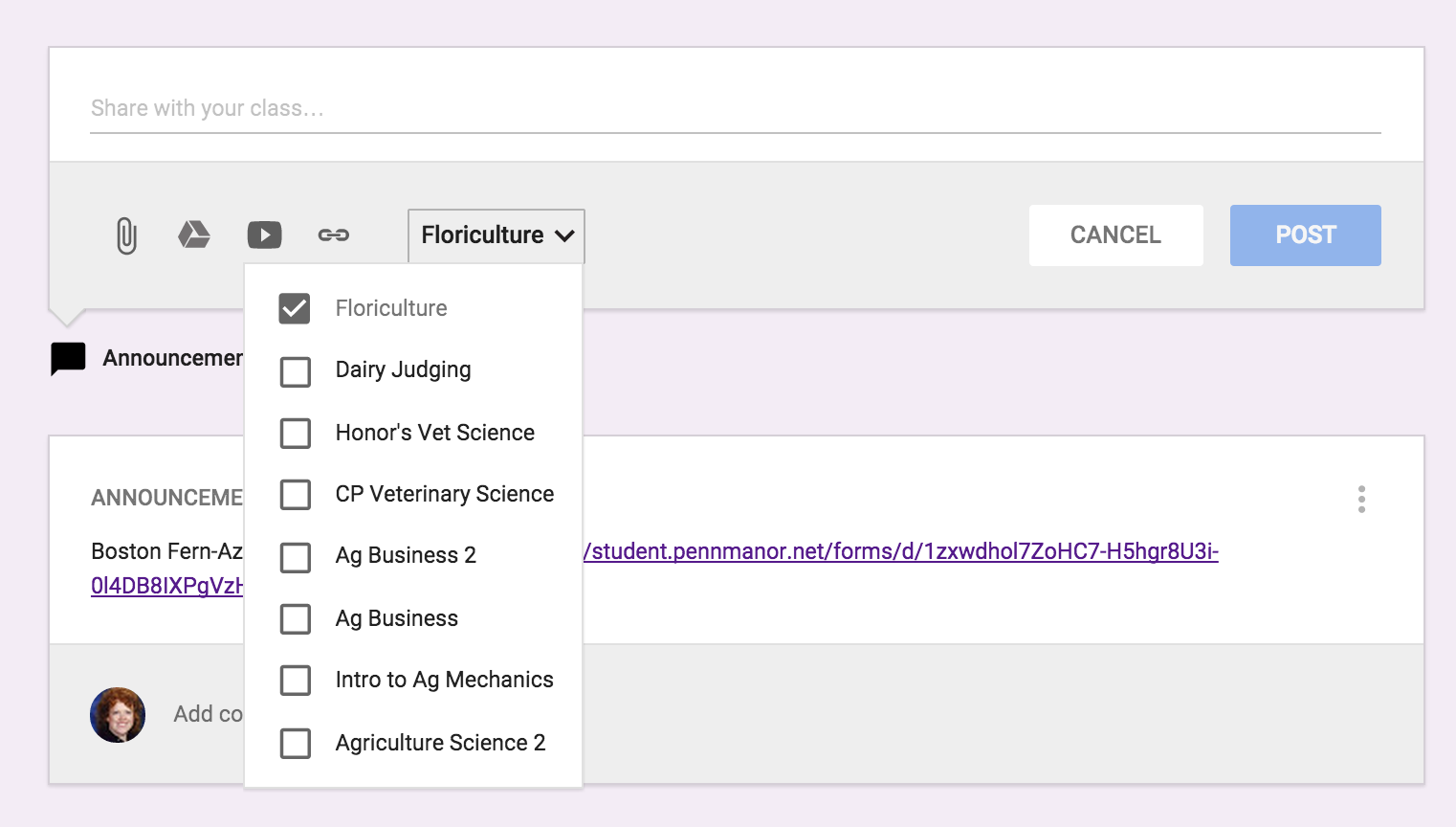
The next best thing about entering an assignment or announcement is you can mass post items.  The picture below is show my entering an "Announcement".  In addition, if you click on the class and the down arrow it will list all the classes you have created in Google Classroom.  So if for instance, you had an assignment you wanted all classes to do on SAE, you could just click on all the classes and it would immediately post to all other streams. 


Below is an example of entering an "Assignment" and you can see there are a few changes.  You can list the "Title of the Assignment", "Description of the Assignment" and set a due date.  Again you have the same options for the source of the assignment and whether you want to post it to multiple classes.  Once you have sent the assignment you can go back in and set the total points.  Once you have submissions, you can download all assignments to evaluate at one time.


There is even a Google Classroom app - pretty awesome stuff.  Here is a link on more information on how to acquire the app.  Below you can see what the classes look like on your mobile device and how class information is displayed.  I love the app option because I can be constantly connected to my classroom in an easy-to-use convenient way.  For example while I was at the Pete&C Conference, I came across a beautiful floral display at the Hershey Hotel, I immediately took a photo and posted the picture on the Floriculture stream and asked students to comment - good or bad.  They enjoyed this because not only was I involving them in what I was doing, but they were able to interact and interject their comments.  


As you can see, I'm a big fan of Google Classroom.  I like its simplicity.  So many times learning management systems get muddled in options which can loose students.  You never want the technology to get in the way of the learning it is supposed to be supporting.  I believe Google Classroom does a wonderful job of doing just this.  Enjoy!


Wednesday, November 5, 2014

World Wisdom With Weaver - Global Learning Blogging!

I'm a surfer. No, not the sun-kissed glistening skin, bleach blonde, "gnarly" dude surfer. I'm a web surfer. Yes, the internet can suck you in to a vortex of funny cat videos, kids being adorable, 50 pins that I'll never actually do, etc. But, it can also be a realm of knowledge, growth, and new ideas to challenge and expand your horizons.

And it connects us to people from all over the world - different cultures, races, religions, ideas - who can share ideas.

In short, global learning and the ever-expanding internet are pretty much hand in hand.  Through this blog series, I've found that to be an ever constant fact. I'm honored to share my insight and discoveries with you, but there are plenty of others out there who are more well-traveled, more eloquent and writing more about global competency!

For this entry, I sought to find other bloggers who are using the Internet to share their ideas and experiences of global learning.

In particular, I'm going to highlight five resources:

1. Matador Network - @MatadorNetwork (also @MatadorU) This isn't a blog per se, but it is a vast resource of travel information and first-hand experiences from people who are living, working, thriving, and writing about travel. In particular, I found an interesting article written about the American vs. European view of travel (Americans Need a Thesis Statement for Travel). I enjoyed the article thoroughly. Now, teachers, some of this content is not G-rated, so I suggest pre-viewing before sharing. But it has some great insight from people who travel. A great resource to use with students. Their contributors come from all over the world and share stories about travel, living in other countries, learning culture, and taking photographs. 

2. Education Week - @educationweek Yes, once again, this isn't a blog I've given you, but please open THIS LINK. On the page are several blogs about teachers and international education/global learning. You have to register to read the entirety of most of the articles, but they have a FREE option (it lets you read three articles/blogs per month. Or you can subscribe for about $60 a year). Some ones of note?
  • A Global Artology Program - Guest blogger Jamaine Smith discussed this program developed by a Build A Bridge initiative. Students from Philadelphia spent weeks over the summer in an experiential learning program. It enlisted the help of artists, science teachers and medical students to develop the curriculum. They worked in and around Philadelphia doing various activities and then got to speak to students from Ecuador as part of the program. I highly recommend the read - cool stuff happening here!
  •  Real World Connections to Global Learning - I like how this blog discusses how the blogger's school has incorporated global learning into multiple academic disciplines. Meghan Sullivan covers efforts from the World History teachers to the French teacher and even discusses how they partnered with Proctor and Gamble in regards to clean water. They have typically done a lesson on water where they collected water to test the quality. Proctor and Gamble provided them with a lesson on "Children's Safe Drinking Water Campaign" and water filter packets. The students then had to clean the water with the packets provided.
3. The NEA Foundation - Global Learning Fellow This blog series (you have to scroll down toward the bottom of the page to link to the blogs) followed a group of 30 teachers who traveled to China in June of this year. It was part of a year-long fellowship. There was one in 2013 to Brazil. 

4. Global Learning Partners - BLOG - "Speaking of Dialogue" This blog has some fun posts about global learning. I encourage you to stop by and check out a few!

5. Shady Side Academy - Global Learning Blog This one is so cool! The students at Shady Side Academy are able to participate in diverse travel programs that take them across the globe and involve them in culture, service experiences and more! This blog is in the words of the very students who are traveling - a great way to show your students the benefits of travel!

Do you have any to add? Please comment below! 

Oh and hey! Have you checked out the NAAE CoP Global Agriculture page? You haven't?!? Well, HERE IS THE LINK - Global Agriculture Space. It's a great place to collaborate with other teachers, share your ideas/curriculum and get ideas from others regarding global learning in agriculture! Let's make it a great resource for everyone!

Agriculturally Yours,

Nicole Weaver
PSU Global Teach Ag! Fellow
Agriculture Science Teacher
@TeamWeaverFever