Showing posts with label Educational Technology. Show all posts

Tuesday, March 31, 2015

#teachagtech -> How to Use Google Classroom


How to Use Google Classroom

This past year I have had the opportunity, along with my colleagues at Penn Manor, to use Google Classroom in my agricultural classroom.  Google Classroom is part of the Google Apps for Education suite that streamlines so many of the great Google tools I love - Google Docs, Google Forms, Google Sheets and Google Drawings (I could go on).  This short video shows how to set up your classes, add students and post items online using Google Classroom.  This learning management system allows you to post announcements, assignments and collect grades all in one place that seamlessly incorporates outside files and Google tools.

Below you will see my dashboard of classes.  It will list the classes along with any upcoming assignments.  (We just switched semesters today, so not many assignments are posted).  As you can see, you as a teacher can join other teacher's classes/groups as we have with the Greenhand Degree group.  I use Google Classroom to make an organizational stream for my Dairy Judging/Management CDE team.  There are many ways you can use Google Classroom to help with educational endeavors.


Below you will see what an individual class looks like.  I have opened up Floriculture.  You can see on the left sidebar there are upcoming assignments and the class code students can easily enter in order to enter the class.  (You can also personally invite them if you so choose.)  Across the top you will find the Stream, Students and About.  The stream is nothing more than a "stream" of the postings, assignments and other various items you post to your class.  You can delete them once done.  The Student tab is a listing of students who are enrolled in the class with a link to their school e-mail.  (I didn't include a picture of that page due to privacy protection - it isn't complicated.)  Next the About page lists your name, email and allows you to post materials.  Here you can list a syllabus, rules and regulations for your class or as it was so wisely suggested to me by Doug Masser at Pequea Valley, you can post information just pertaining to the lessons you are covering at that time for easy reference.  Below you can see I have posted a link to an identification quiz students were required to take and another assignment to post on their digital portfolios their experiences at Longwood Gardens.  It literally takes a few clicks to make this all happen.  


Below you can see a snapshot of the stream where you can choose to post a file from your computer, link something from GoogleDrive, embed a video or include a outside link.  Please notice the "Announcement" and "Assignment" options.  I will explain these further below.  


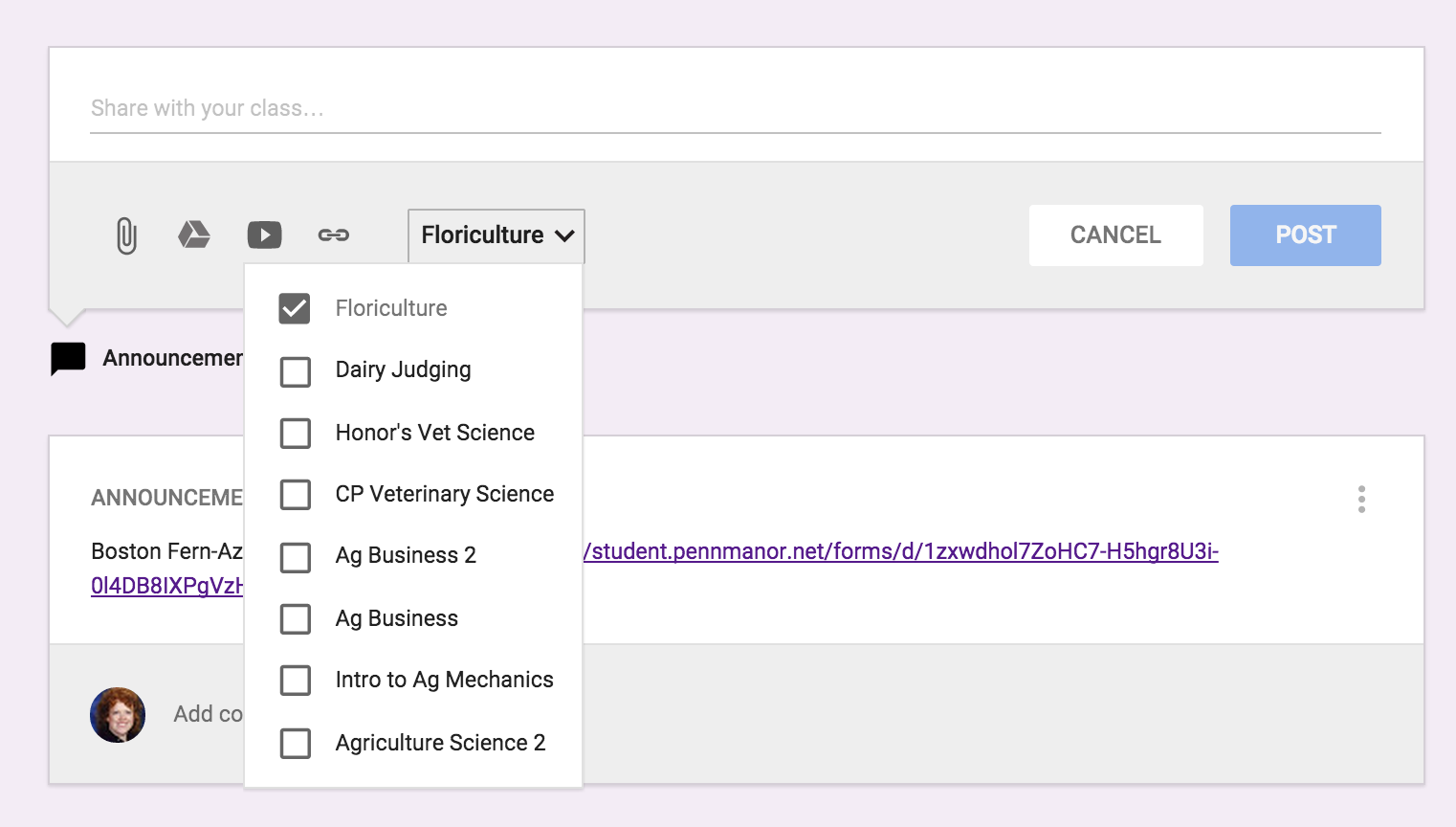
The next best thing about entering an assignment or announcement is you can mass post items.  The picture below is show my entering an "Announcement".  In addition, if you click on the class and the down arrow it will list all the classes you have created in Google Classroom.  So if for instance, you had an assignment you wanted all classes to do on SAE, you could just click on all the classes and it would immediately post to all other streams. 


Below is an example of entering an "Assignment" and you can see there are a few changes.  You can list the "Title of the Assignment", "Description of the Assignment" and set a due date.  Again you have the same options for the source of the assignment and whether you want to post it to multiple classes.  Once you have sent the assignment you can go back in and set the total points.  Once you have submissions, you can download all assignments to evaluate at one time.


There is even a Google Classroom app - pretty awesome stuff.  Here is a link on more information on how to acquire the app.  Below you can see what the classes look like on your mobile device and how class information is displayed.  I love the app option because I can be constantly connected to my classroom in an easy-to-use convenient way.  For example while I was at the Pete&C Conference, I came across a beautiful floral display at the Hershey Hotel, I immediately took a photo and posted the picture on the Floriculture stream and asked students to comment - good or bad.  They enjoyed this because not only was I involving them in what I was doing, but they were able to interact and interject their comments.  


As you can see, I'm a big fan of Google Classroom.  I like its simplicity.  So many times learning management systems get muddled in options which can loose students.  You never want the technology to get in the way of the learning it is supposed to be supporting.  I believe Google Classroom does a wonderful job of doing just this.  Enjoy!


Tuesday, December 9, 2014

Digital Early Field Pre-Service Teaching Experiences: A Virtual Partnership between Minnesota & Penn State

They say never say “never”…..and it rings true!  I have always said, I never want to take an online class and I would never want to teach one, well… I was wrong!  This semester Janae Bickhart (@JanaeBickhart) and I were give the opportunity to be teaching assistance for a class in Minnesota from Penn State!  Yep, it all happened in Ferguson Building room 206 on Penn State's campus at University Park. It was unique, it was real and it was innovative.

Mr. Eric Sawatzke (@ESawatzke), Agriscience Teacher and FFA Advisor at Dassel-Cokato High School leads a unique, real and innovative program in Minnesota.  Eric will take a group of students to South Africa in August to engage in international agriculture.  To develop global agriculture learning objectives and asses global competency in a high school Global Agriculture and Agribusiness classroom, Dassel-Cokato Agriculture Program and Penn State Global Teach Ag! formed a partnership.   Janae Bickhart, 2015 AEE student teacher candidate and myself, Kayla Hack, 2017 student teacher candidate signed up for the challenge. 

How did this happen?
"The ability to talk to someone outside of our school.
 Gave us a second view on things."- Dassel Cakota Student
Every Friday the teaching assistants would video chat with the students in MN to teach a lesson.  The focus: Global Agriculture.  Lessons ranged from hunger issues worldwide to the importance of cooperatives as an agriculture business model for developing nations.  As teaching assistants we engaged virtually in the classroom Fridays and assisted with other 
grading and homework guidance. 

"It was something different, it made class more fun. I actually looked forward to Fridays not just because of the week end, but because of being able to talk to Penn State. It made the class way more interesting!"- Dassel Cokato Student

This opportunity was unique, it was taught from an office weekly to students across the country. 

It was real, the students through video were real, interactive, funny and impressive high school students that took an interest in global agriculture. We received real experience teaching lessons and using innovative technology.

It was innovative, when something is new creativity ripples, adapting lessons to be taught virtually while students were still able to have concrete and reflective experiences in class took creativity. This opportunity provided professional development for a pre-service agricultural 
educator and a twist on classroom learning. 

Unique. Real. Innovative. - Penn State Teach Ag!


To learn more about the PSU Global Teach Ag! Initiative check out our website: http://aese.psu.edu/teachag/global.  

Yours in trying new opportunities,

Kayla


Kayla Hack
Global Teach Ag! Intern
2017 Agricultural Education Student Teacher Candidate
@HackKayla


Thursday, December 4, 2014

#teachagtech -> For the Love of Nearpod

For the Love of Nearpod


For the Love of Nearpod...Awesome Presentation and Formative Assessment Tool!

We are surrounded by apps, new technologies and constant reminders of better tools for our classroom.  It can be overwhelming.  However, every once and a while, a platform truly does deliver what it promises.  Nearpod is one I have come to trust and appreciate as an effective tool in the classroom.  Nearpod takes ordinary presentations and makes them interactive.  You can use Power Point Presentations you already have developed and use them in Nearpod (they just need to be converted to PDF format.)


Here is a short video on an introduction to Nearpod:


Here is a video on the teacher's perspective in Nearpod using an animal science based presentation:


Here is a video on the student's perspective in Nearpod as the teacher is presenting a "Live Session":


You have many options when creating your Nearpod to add various forms of assessments.  You can do open-ended questions, polls, drawings, and quizzes.  The following video will help with showing you the various options within Nearpod:


I hope this great interactive tool can help diversify your teaching techniques.  I know I have enjoyed planning lessons around using Nearpod and increasing the engagement of my students.

Happy Nearpod'ing!

***

If you have specific needs regarding technology in your classroom or have additional questions about Nearpod, please feel free to connect with me via the TeachAg! Technology Help Ticket


Yours in the Quest to be a Tech Savvy Aggie,

Monday, September 29, 2014

Bringing You Along on the Quest to be a Tech Savvy Aggie…


In the spring of 2013, I set out to create a blog {E-Learn in Ag: A Quest to be Tech Savvy Aggie} to begin journaling ways of diversifying teaching techniques by integrating technology.  It began as an online notebook of sorts, but to also {hopefully} help fellow educators in their classroom.  Over the last several years, I have had the privilege of developing online curriculum and taking some post-masters courses in learning technologies.  I have learned a great deal about how effective online learning happens {and doesn’t}.  As I start this journey, I’m not sure how I feel about the title “technologist” - this implies I’m an expert in this field - but I would rather think of myself as a lifetime learner who is focusing efforts in the area of technology and to help out my fellow educators.  I am humbled and feel privileged to be asked to provide information to help my colleagues provide resources to ease the magnitude of responsibilities placed on ag teachers, find ways to be more effective educators, provide support for teacher evaluations and practically integrate technology in their classroom.  So, here we go….

After teaching for nine years in my hometown at the Juniata HS Agriculture program as a single teacher to my current role as a team member of four agriculture educators at Penn Manor High School, I have seen a wide array of differing opportunities available to educators and differences in technology utilization.  My perspective on technology is that no one technological tool will fix poor classroom pedagogy. I feel integrating technology is one more tool for your teacher toolbox.  If managed properly, it can be a way to more effectively manage time, assessments and student engagement.  In addition, I feel we must present students with as advanced technology as our districts will provide to keep them current so they are poised to be successful in future careers.  


In previous educational technology experiences, I have learned in some cases, we end up teaching the platform for the technology as opposed to effectively communicating the course content we want the student to master.  In this time period of teaching the platform (ie Moodle, Blackboard, or MindMeister), we lose them just as if we were standing in front of the room lecturing and dictating from a book with our kids slouched over in their seats daydreaming about what the coming weekend.  {Below is the visual I had of my classroom when things go wrong.}


Through my series of blog posts, I will be covering the following general topics:
  •   Easy classroom integration tools (Nearpod, Socrative, etc)
  •   Why technology and SAMR Model of technology integration.
  •   Google Drive and Education Tools
  •   Open-Source vs iPad Technologies
  •   Agriculture Apps
  •   Moodle and Blackboard use in the classroom
  •   Graphic design, video and using other types of media


I ask you to begin thinking about what you need help with in your classroom: “if I could only do this…it would be so much easier”.  Evaluate how you use technology in your classroom and what you would like to improve on.  In addition, I ask you to begin thinking about how social media plays a role in your agriculture program.  I would like to tailor blog posts to real-time problems and issues.

I hope what I have to offer will be of use to you in your classroom.  If you would like to see learning technology tidbits, follow me on Twitter @DGCornman.  

Yours in the Quest to be a Tech Savvy Aggie,

Diane Glock-Cornman
PSU Teach Ag! Technologist
@DGCornman