Showing posts with label penn manor. Show all posts

Monday, October 1, 2018

October 2018 Student of the Month: Victoria Herr (@Victoria_Herr)

Each month we like to highlight students that have gone above and beyond in their involvement in the agriculture education program at PSU! Our October student of the month is Ms. Victoria Herr! Victoria is a senior in the Agricultural and Extension Education Program, preparing to student teach in the spring at Penns Manor high school in Indiana County, PA. Let's learn a little bit about her as we celebrate her achievements and success!

Victoria has been involved in FFA all throughout her high school career at Penn Manor, competing in multiple State and National Career Development Events (CDE's). Her Supervised Agricultural Experience (SAE) in high school was raising hogs and dairy beef. She served as a county officer and went on to also serve as the 2014 - 2015 Pennsylvania FFA secretary and received her American Degree in 2015. 

Since arriving at Penn State Victoria has been very active within the college community. Here on campus, Victoria has been involved in Teach Ag Society, Collegiate FFA, and is a founding member and current President of The LEAD Society at Penn State. She also is a member of Alpha Tau Alpha chapter on campus, the national professional honorary agricultural education organization. We asked Victoria what her favorite thing about Penn State is, and she responded, " I love the family atmosphere and camaraderie! I've always felt at home at Penn State!"

Fun Facts:
Hometown: Lancaster, PA
Birthday: June 11th
Favorite PSU Class: HORT 497: Hydroponics and Aquaponics
Favorite Sports Team: Penn State Football!!
Favorite Hangout on Campus: 213 Ferguson
Favorite Place to Eat in State College: The Field or Big Bowl

We congratulate Victoria and wish her the best of luck as she prepares for student teaching this spring and graduation in May of 2019. Seeing her accomplishments thus far, it'll be a breeze! If you would like to follow her on her journey, check out her Twitter (@Victoria_Herr)!

Thursday, January 21, 2016

Victoria Herr: A Showman, Volunteer and Scholar #studentsuccess

Victoria credits much of her success to her
time in FFA.  Pictured with FFA Advisor
Neil Fellenbaum. 
For a Pennsylvania Aggie, PA Farm Show is an annual tradition, the largest of it’s kind in the US. Home to 10,000 competitive exhibits, 300 commercial exhibits and almost 6,000 animals and the famous milk shakes and other food court delicacies, Farm Show is the place to be. It’s where many first year FFA members receive the coveted blue corduroy jacket or the prestigious Keystone State FFA Degree at the Mid Winter Convention. It is also where a few outstanding students from Penn State’s College of Agricultural Sciences receive honored Farm Show Scholarships. One of those was Victoria Herr. Victoria was a recipient of the Farm Show Foundation Scholarship.


Victoria is no stranger to farm show, she said “I have been attending the Farm Show literally since before I can remember. I have never missed a year in my life!!"   She volunteered at Farm Show, showed a hog as a high school student and received her Keystone Degree, all through Farm Show. This year her success continued with the scholarship. The Pennsylvania Farm Show Foundation Scholarship is a highly competitive and honorable award. For Victoria, the award was much more than the award or money, because the farm show she says is near to her heart. The Farm Show scholarship targets students that are or have been a member of 4-H or FFA and showed a animal through the farm show. Showing a hog, being actively involved in the Penn Manor FFA and now pursuing an Agriculture Education degree allowed her to stand out for this scholarship.


Victoria and her family visit the Farm Show every year!
The Pennsylvania Farm Show is a family affair for Victoria.  She remembers racing to the food court to see who would try all the new foods first. Victoria says,  "When I get my first bite of fried mushrooms or lamb stew for the year, I instantly think back to so many fun memories of attending the Farm Show with my whole family and arguing over which delicacy to get first!"  Congratulations Victoria on all your accomplishments, from attending farm show as a little girl, as a showman, volunteer and scholar, and best wishes on your future travels as you prepare to be an Agricultural Educator!
To learn more about starting on the path to having a career that makes a positive impact on the lives of students across the globe by becoming an agricultural educator, please contact the agricultural teacher education program at teachag@psu.edu. Follow us on Twitter at TeachAgPSU, on Facebook, or on our blog. 


Kayla Hack

Student Blogger

Twitter Handle: @hackkayla

2017 Agriculture Education Student Teacher

Tuesday, March 31, 2015

#teachagtech -> How to Use Google Classroom


How to Use Google Classroom

This past year I have had the opportunity, along with my colleagues at Penn Manor, to use Google Classroom in my agricultural classroom.  Google Classroom is part of the Google Apps for Education suite that streamlines so many of the great Google tools I love - Google Docs, Google Forms, Google Sheets and Google Drawings (I could go on).  This short video shows how to set up your classes, add students and post items online using Google Classroom.  This learning management system allows you to post announcements, assignments and collect grades all in one place that seamlessly incorporates outside files and Google tools.

Below you will see my dashboard of classes.  It will list the classes along with any upcoming assignments.  (We just switched semesters today, so not many assignments are posted).  As you can see, you as a teacher can join other teacher's classes/groups as we have with the Greenhand Degree group.  I use Google Classroom to make an organizational stream for my Dairy Judging/Management CDE team.  There are many ways you can use Google Classroom to help with educational endeavors.


Below you will see what an individual class looks like.  I have opened up Floriculture.  You can see on the left sidebar there are upcoming assignments and the class code students can easily enter in order to enter the class.  (You can also personally invite them if you so choose.)  Across the top you will find the Stream, Students and About.  The stream is nothing more than a "stream" of the postings, assignments and other various items you post to your class.  You can delete them once done.  The Student tab is a listing of students who are enrolled in the class with a link to their school e-mail.  (I didn't include a picture of that page due to privacy protection - it isn't complicated.)  Next the About page lists your name, email and allows you to post materials.  Here you can list a syllabus, rules and regulations for your class or as it was so wisely suggested to me by Doug Masser at Pequea Valley, you can post information just pertaining to the lessons you are covering at that time for easy reference.  Below you can see I have posted a link to an identification quiz students were required to take and another assignment to post on their digital portfolios their experiences at Longwood Gardens.  It literally takes a few clicks to make this all happen.  


Below you can see a snapshot of the stream where you can choose to post a file from your computer, link something from GoogleDrive, embed a video or include a outside link.  Please notice the "Announcement" and "Assignment" options.  I will explain these further below.  


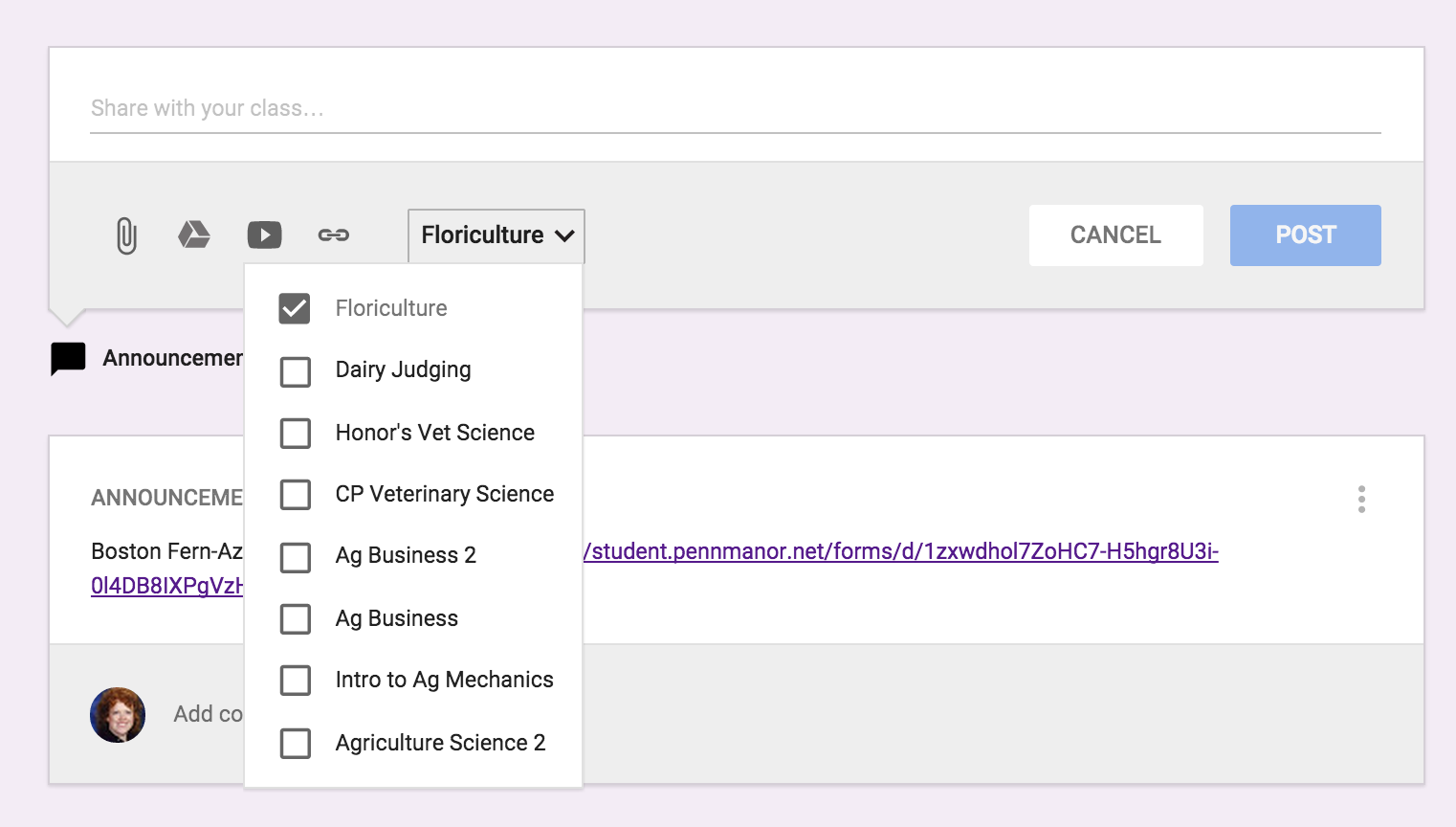
The next best thing about entering an assignment or announcement is you can mass post items.  The picture below is show my entering an "Announcement".  In addition, if you click on the class and the down arrow it will list all the classes you have created in Google Classroom.  So if for instance, you had an assignment you wanted all classes to do on SAE, you could just click on all the classes and it would immediately post to all other streams. 


Below is an example of entering an "Assignment" and you can see there are a few changes.  You can list the "Title of the Assignment", "Description of the Assignment" and set a due date.  Again you have the same options for the source of the assignment and whether you want to post it to multiple classes.  Once you have sent the assignment you can go back in and set the total points.  Once you have submissions, you can download all assignments to evaluate at one time.


There is even a Google Classroom app - pretty awesome stuff.  Here is a link on more information on how to acquire the app.  Below you can see what the classes look like on your mobile device and how class information is displayed.  I love the app option because I can be constantly connected to my classroom in an easy-to-use convenient way.  For example while I was at the Pete&C Conference, I came across a beautiful floral display at the Hershey Hotel, I immediately took a photo and posted the picture on the Floriculture stream and asked students to comment - good or bad.  They enjoyed this because not only was I involving them in what I was doing, but they were able to interact and interject their comments.  


As you can see, I'm a big fan of Google Classroom.  I like its simplicity.  So many times learning management systems get muddled in options which can loose students.  You never want the technology to get in the way of the learning it is supposed to be supporting.  I believe Google Classroom does a wonderful job of doing just this.  Enjoy!